A black hole in Three.js, step by step: a shader you can copy
One HTML file, Three.js and a fragment shader: light that bends, the disk above and below the shadow, and the side that shines brighter. Every step explained and the full code at the end.

Jonás Javier Encarnación9 min read
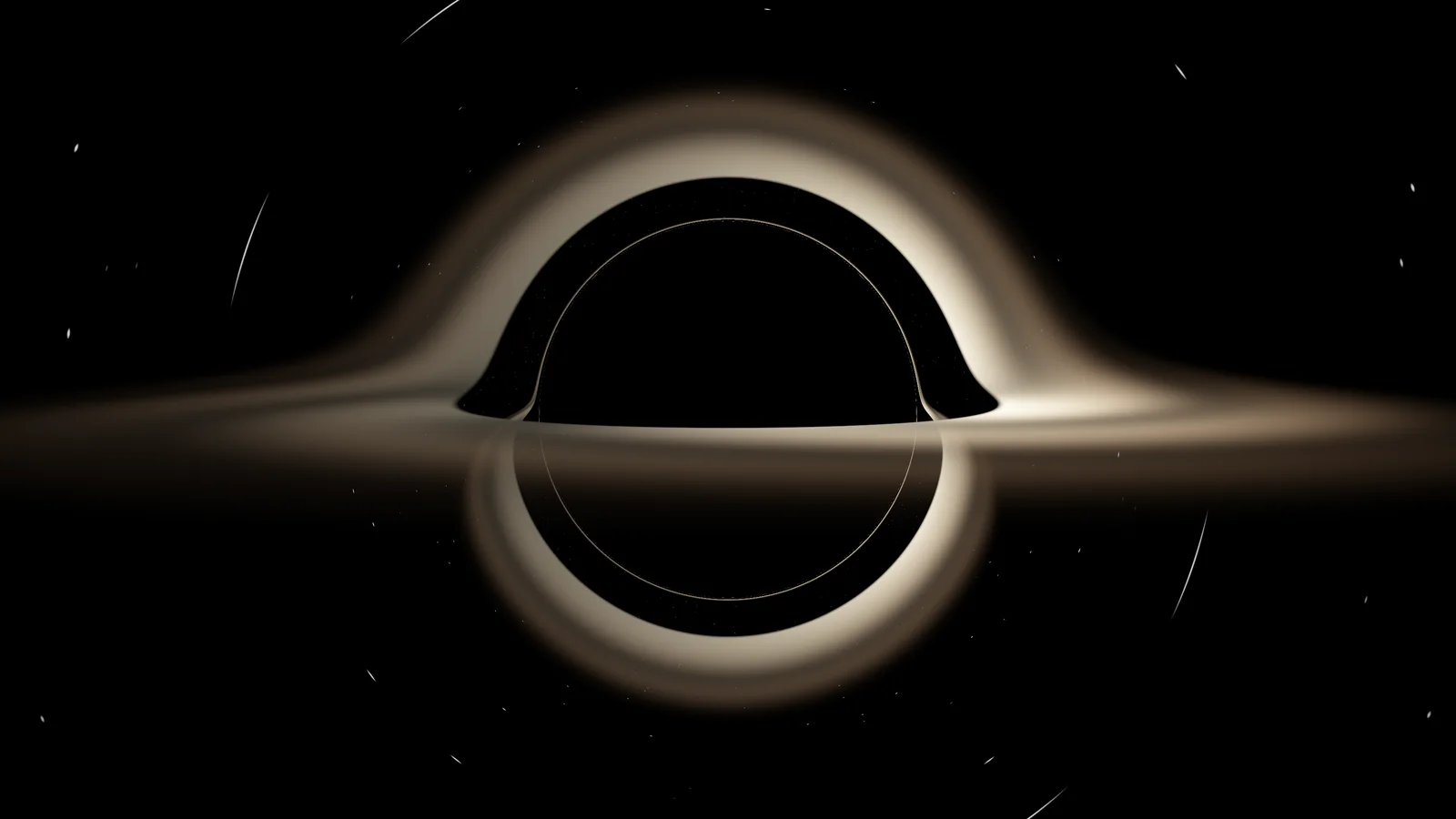
In How I built a black hole in WebGL I explained how this site's Gargantua is built, with everything it took to run well on any device. This post is something else: the minimal version, in a single HTML file you can copy, open and change. About 150 lines, Three.js and nothing else.
By the end you'll have this: the shadow, the accretion disk crossing it, its back side lifted above by gravity, the secondary image below, and the side coming toward you brighter than the side moving away.
1. A full-screen canvas
All the work happens in a fragment shader, which runs once per pixel. Three.js only has to give it a rectangle covering the screen. An orthographic camera and a 2 × 2 plane whose vertices are written straight into screen coordinates are enough:
const scene = new THREE.Scene();
const camera = new THREE.OrthographicCamera(-1, 1, 1, -1, 0, 1);

const material = new THREE.ShaderMaterial({
  uniforms: {
    uTime: { value: 0 },
    uResolution: { value: new THREE.Vector2() },
    uCamPos: { value: new THREE.Vector3(0, 1.1, -16) },
  },
  vertexShader: /* glsl */ `
    varying vec2 vUv;
    void main() {
      vUv = uv;
      gl_Position = vec4(position.xy, 0.0, 1.0);
    }
  `,
  fragmentShader,
});
scene.add(new THREE.Mesh(new THREE.PlaneGeometry(2, 2), material));
uCamPos is the camera position inside the shader: 16 units behind the
black hole and 1.1 above the disk plane, almost edge-on, which is how it looks
in Interstellar.
2. One ray per pixel
The shader starts by turning the pixel into a direction. With the camera looking at the origin, it builds three axes (forward, right, up) and blends them by the pixel's position on screen:
vec2 uv = (vUv - 0.5) * vec2(uResolution.x / uResolution.y, 1.0);

vec3 forward = normalize(-uCamPos);
vec3 right = normalize(cross(forward, vec3(0.0, 1.0, 0.0)));
vec3 up = cross(right, forward);
vec3 dir = normalize(forward * 1.4 + uv.x * right + uv.y * up);
vec3 pos = uCamPos;
The 1.4 is the focal length: bigger means more zoom.
3. Bending light
This is where the black hole lives. Instead of following the ray in a straight line, we let it fall. The orbit of light around a non-spinning mass (the Schwarzschild solution) can be written as a central force in Cartesian coordinates:
a = −1.5 · rs · h² · r / |r|⁵
where rs is the Schwarzschild radius (the horizon) and h = r × v. The handy
part is that h² doesn't change along the ray: you compute it once. I use
rs = 1 as the unit for the whole shader.
To step forward I use the Verlet integrator, which stays stable with large steps:
vec3 h = cross(pos, dir);
float h2 = dot(h, h);

for (int i = 0; i < STEPS; i++) {
  float r2 = dot(pos, pos);
  float r = sqrt(r2);
  if (r < RS) break; // it fell in: the pixel stays black

  float dt = clamp(0.06 * r2 / sqrt(h2 + 1e-4), 0.01, 0.8);

  vec3 acc = -1.5 * RS * h2 * pos / (r2 * r2 * r);
  vec3 nextPos = pos + dir * dt + 0.5 * acc * dt * dt;
  float n2 = dot(nextPos, nextPos);
  vec3 nextAcc = -1.5 * RS * h2 * nextPos / (n2 * n2 * sqrt(n2));
  vec3 nextDir = dir + 0.5 * (acc + nextAcc) * dt;

  // ... the disk goes here (step 4)

  pos = nextPos;
  dir = nextDir;
}
The step size, dt, covers roughly the same angle around the hole on every
iteration: short steps up close, where the curve is sharp, and long ones far
away. With fixed steps, rays that loop several times near the horizon run out
of iterations before they escape.
With just this, the black shadow and the thin ring at its edge, the photon ring, already show up. Nobody draws them: they're the rays that fall in and the ones that almost do.
4. The disk
The disk lies on the y = 0 plane. On every step I check whether the ray
crossed it (whether y changed sign) and, if it did, where:
if (pos.y * nextPos.y < 0.0) {
  vec3 hit = mix(pos, nextPos, pos.y / (pos.y - nextPos.y));
  vec4 d = disk(hit, dir);
  color += (1.0 - alpha) * d.rgb * d.a;
  alpha += (1.0 - alpha) * d.a;
}
Because the ray keeps going after crossing, it can cross the plane again on the
far side of the hole. That's how, with nothing extra, the back of the disk
appears above the shadow and the secondary image below it. alpha accumulates
opacity so what's in front covers what's behind.
Inside disk(), the disk runs from 3 to 10 radii. It starts at 3 because
there are no stable orbits closer in: gas falls. It spins like a Keplerian
system, faster the closer it is, with angular speed proportional to r^−1.5:
float angle = atan(p.z, p.x) + uTime * 2.0 * pow(r, -1.5);
float streaks = 0.65 + 0.35 * sin(angle * 4.0 + log(r) * 18.0);
The streaks are a sine in angle and in log(r): the differential rotation
winds them up on its own and gives the swirl.
5. Doppler: the approaching side shines brighter
Gas on one side of the disk comes toward you and gas on the other side moves
away. The approaching side looks brighter. The factor is
D = 1 / (γ · (1 − v · cos θ)), and intensity is multiplied by D³:
float speed = sqrt(RS / (2.0 * (r - RS))); // orbital speed, as a fraction of c
float gamma = 1.0 / sqrt(1.0 - speed * speed);
float cosTheta = dot(normalize(vec3(-p.z, 0.0, p.x)), -normalize(dir));
float doppler = pow(1.0 / (gamma * (1.0 - speed * cosTheta)), 3.0);
This part failed on me twice while testing it, so here are both:
- The speed. At first I used Newton's,
√(rs / 2r). It's too slow near the hole, and the difference between the two sides was barely visible. The right one for a circular orbit, measured by an observer at rest, is√(rs / (2(r − rs))): at the inner edge, half the speed of light. - The disk profile. Opacity started at zero right at the inner edge, which is where the gas moves fastest. The effect was there, just in the part you couldn't see. Now the disk is denser and brighter on the inside:
float falloff = (1.0 - t) * (1.0 - t);
vec3 color = mix(hot, cool, t) * streaks * doppler * falloff * 0.6;
float opacity = smoothstep(0.0, 0.02, t) * (1.0 - t);
6. Stars and tone
If the ray gets far enough away (more than 40 radii and heading outward), I look up which star sits in its final direction. Since that's the direction after bending, stars near the hole come out shifted and stretched into arcs: that's gravitational lensing acting on the background too.
At the end, a simple tone curve so the bright side doesn't blow out, and gamma correction:
color = 1.0 - exp(-color * 1.4);
gl_FragColor = vec4(pow(color, vec3(1.0 / 2.2)), 1.0);
What it's missing (on purpose)
This is a starting point, not the site's Gargantua. What it doesn't have:
- Performance. 300 steps per pixel across the whole screen is heavy. On a
phone, lower
STEPSorsetPixelRatio. On the site the step budget adapts, and rays that are certain to fall in stop early. - A spinning hole. This is Schwarzschild, not Kerr. The film's spins; tracing Kerr per pixel in real time is far more expensive.
- A properly textured disk, bloom, and the two copies of the disk that keep the rotation from winding it into thin stripes. All of that is in the long post.
If you want to understand the physics of what you just coded —why the shadow is bigger than the horizon, what the photon ring is— it's in The physics of Interstellar's black hole.
The full file
Save it as black-hole.html and open it through any local server (for example
npx serve or python -m http.server). JavaScript modules won't load if you
just double-click the file.
<!doctype html>
<html lang="en">
<head>
  <meta charset="utf-8">
  <meta name="viewport" content="width=device-width, initial-scale=1">
  <title>Black hole in Three.js</title>
  <style>html, body { margin: 0; height: 100%; background: #000; overflow: hidden; }</style>
  <script type="importmap">
    { "imports": { "three": "https://cdn.jsdelivr.net/npm/three@0.185.1/build/three.module.js" } }
  </script>
</head>
<body>
<script type="module">
import * as THREE from "three";

const renderer = new THREE.WebGLRenderer();
renderer.setPixelRatio(Math.min(window.devicePixelRatio, 2));
renderer.setSize(window.innerWidth, window.innerHeight);
document.body.appendChild(renderer.domElement);

const scene = new THREE.Scene();
const camera = new THREE.OrthographicCamera(-1, 1, 1, -1, 0, 1);

const fragmentShader = /* glsl */ `
  uniform float uTime;
  uniform vec2 uResolution;
  uniform vec3 uCamPos;
  varying vec2 vUv;

  const float RS = 1.0;        // Schwarzschild radius: the unit for everything
  const float DISK_IN = 3.0;   // inner edge of the disk (innermost stable orbit)
  const float DISK_OUT = 10.0; // outer edge
  const int STEPS = 300;

  float hash(vec3 p) {
    p = fract(p * 0.3183099 + 0.1);
    p *= 17.0;
    return fract(p.x * p.y * p.z * (p.x + p.y + p.z));
  }

  // Stars: one grid cell per direction; a few of them light up.
  vec3 stars(vec3 dir) {
    vec3 p = dir * 180.0;
    vec3 cell = floor(p);
    float h = hash(cell);
    float d = length(fract(p) - 0.5);
    float star = step(0.995, h) * smoothstep(0.35, 0.0, d);
    return vec3(star) * (0.6 + 0.4 * hash(cell + 7.0));
  }

  // Disk color at point p (on the y = 0 plane), seen from dir.
  vec4 disk(vec3 p, vec3 dir) {
    float r = length(p.xz);
    if (r < DISK_IN || r > DISK_OUT) return vec4(0.0);
    float t = (r - DISK_IN) / (DISK_OUT - DISK_IN);

    // Keplerian rotation: the inner edge spins much faster.
    float angle = atan(p.z, p.x) + uTime * 2.0 * pow(r, -1.5);
    float streaks = 0.65 + 0.35 * sin(angle * 4.0 + log(r) * 18.0);

    // Doppler: the side coming toward the camera shines brighter.
    float speed = sqrt(RS / (2.0 * (r - RS))); // orbital speed, as a fraction of c
    float gamma = 1.0 / sqrt(1.0 - speed * speed);
    float cosTheta = dot(normalize(vec3(-p.z, 0.0, p.x)), -normalize(dir));
    float doppler = pow(1.0 / (gamma * (1.0 - speed * cosTheta)), 3.0);

    vec3 hot = vec3(1.0, 0.85, 0.6);
    vec3 cool = vec3(0.9, 0.35, 0.08);
    // Brighter and denser near the inner edge, where the gas is hottest.
    float falloff = (1.0 - t) * (1.0 - t);
    vec3 color = mix(hot, cool, t) * streaks * doppler * falloff * 0.6;
    float opacity = smoothstep(0.0, 0.02, t) * (1.0 - t);
    return vec4(color, opacity);
  }

  void main() {
    vec2 uv = (vUv - 0.5) * vec2(uResolution.x / uResolution.y, 1.0);

    // Camera looking at the origin.
    vec3 forward = normalize(-uCamPos);
    vec3 right = normalize(cross(forward, vec3(0.0, 1.0, 0.0)));
    vec3 up = cross(right, forward);
    vec3 dir = normalize(forward * 1.4 + uv.x * right + uv.y * up);
    vec3 pos = uCamPos;

    // h² is conserved along the ray: compute it once.
    vec3 h = cross(pos, dir);
    float h2 = dot(h, h);

    vec3 color = vec3(0.0);
    float alpha = 0.0;

    for (int i = 0; i < STEPS; i++) {
      float r2 = dot(pos, pos);
      float r = sqrt(r2);
      if (r < RS) break; // it fell in: the pixel stays black

      // Shorter steps near the hole, longer far away.
      float dt = clamp(0.06 * r2 / sqrt(h2 + 1e-4), 0.01, 0.8);

      // Verlet: light falls toward the hole with a = -1.5·rs·h²·r / |r|⁵.
      vec3 acc = -1.5 * RS * h2 * pos / (r2 * r2 * r);
      vec3 nextPos = pos + dir * dt + 0.5 * acc * dt * dt;
      float n2 = dot(nextPos, nextPos);
      vec3 nextAcc = -1.5 * RS * h2 * nextPos / (n2 * n2 * sqrt(n2));
      vec3 nextDir = dir + 0.5 * (acc + nextAcc) * dt;

      // Did it cross the disk plane on this step?
      if (pos.y * nextPos.y < 0.0) {
        vec3 hit = mix(pos, nextPos, pos.y / (pos.y - nextPos.y));
        vec4 d = disk(hit, dir);
        color += (1.0 - alpha) * d.rgb * d.a;
        alpha += (1.0 - alpha) * d.a;
      }

      pos = nextPos;
      dir = nextDir;

      // It escaped: look up the stars in its final direction.
      if (r > 40.0 && dot(pos, dir) > 0.0) {
        color += (1.0 - alpha) * stars(normalize(dir));
        break;
      }
    }

    color = 1.0 - exp(-color * 1.4); // simple tone curve so nothing blows out
    gl_FragColor = vec4(pow(color, vec3(1.0 / 2.2)), 1.0);
  }
`;

const material = new THREE.ShaderMaterial({
  uniforms: {
    uTime: { value: 0 },
    uResolution: { value: new THREE.Vector2() },
    uCamPos: { value: new THREE.Vector3(0, 1.1, -16) },
  },
  vertexShader: /* glsl */ `
    varying vec2 vUv;
    void main() {
      vUv = uv;
      gl_Position = vec4(position.xy, 0.0, 1.0);
    }
  `,
  fragmentShader,
});
scene.add(new THREE.Mesh(new THREE.PlaneGeometry(2, 2), material));

function resize() {
  renderer.setSize(window.innerWidth, window.innerHeight);
  renderer.getDrawingBufferSize(material.uniforms.uResolution.value);
}
window.addEventListener("resize", resize);
resize();

renderer.setAnimationLoop((time) => {
  material.uniforms.uTime.value = time / 1000;
  renderer.render(scene, camera);
});
</script>
</body>
</html>
Things to tweak first: uCamPos (raise y to see the disk from above),
DISK_IN and DISK_OUT, and the 1.4 focal length.
The full version
If you want to see how far it can go, the Observatory's Gargantua simulator starts from this same equation, and in Study mode you can switch off the lens, the Doppler effect and the secondary images one at a time. And if you need something like this for your product or brand, here's how I work.